Skyrocket Your Blogger Earnings: 7 Powerful Reasons to Embrace AdX for Blogger in 2026!
Table of Contents
1.Introduction: Why AdX for Blogger is a Game-Changer
2.AdSense vs. Google AdX for Blogger: A Crucial Comparison
3.Unlocking Higher Revenue: The Core Benefit of AdX for Blogger
4.Navigating the Google AdX Approval Process for Blogger
5.Integrating AdX on Your Blogger Site: A Step-by-Step Guide
6.Optimizing Your AdX for Blogger Setup for Maximum Performance
7.Future-Proofing Your Monetization Strategy with AdX
8.Conclusion: The Undeniable Advantage of AdX for Blogger
1. Introduction: Why AdX for Blogger is a Game-Changer
Are you a Blogger user looking to significantly increase your advertising revenue? If you’ve been relying solely on Google AdSense, it’s time to explore a more powerful alternative: AdX for Blogger. Google Ad Exchange (AdX) offers a premium marketplace for publishers, providing access to a wider pool of advertisers and advanced optimization features that can lead to a substantial boost in your earnings. In 2026, understanding and implementing AdX for Blogger is no longer a luxury but a necessity for serious content creators aiming for financial success.
This comprehensive guide will delve into everything you need to know about leveraging AdX for Blogger, from its fundamental advantages over AdSense to the step-by-step process of getting approved and integrating it into your site. We’ll cover how AdX for Blogger can unlock higher CPMs, improve fill rates, and ultimately skyrocket your blog’s profitability. Prepare to transform your monetization strategy and achieve unprecedented revenue growth.
2. AdSense vs. Google AdX for Blogger: A Crucial Comparison
Many bloggers are familiar with Google AdSense, the entry-level advertising platform that provides a straightforward way to monetize content. However, Google AdX operates on a different, more sophisticated level. While both are Google products, AdX is a real-time bidding (RTB) exchange that connects publishers with a vast network of premium advertisers, including demand-side platforms (DSPs) and ad networks, beyond what AdSense alone offers.
Here’s a quick comparison to highlight the key differences:
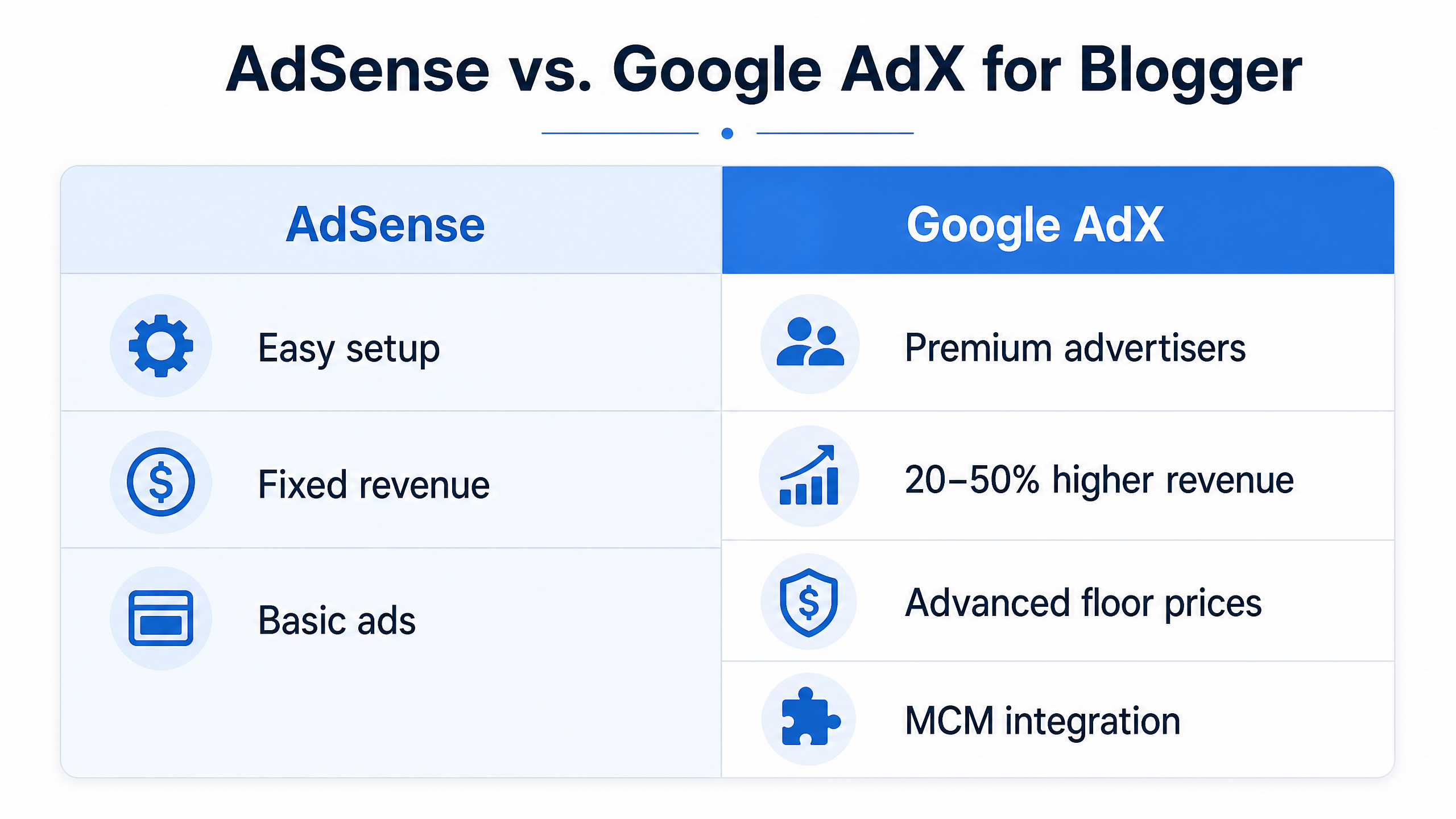
Alt text: AdSense vs. Google AdX for Blogger Comparison
As you can see, AdX for Blogger provides a more robust and competitive environment for your ad inventory. This increased competition among advertisers directly translates to higher bids and, consequently, greater revenue for your blog. For a deeper dive into the distinctions, you can refer to this Google AdX vs. AdSense article .
3. Unlocking Higher Revenue: The Core Benefit of AdX for Blogger
The most compelling reason to switch to or integrate AdX for Blogger is the potential for significantly higher earnings. Publishers often report a 20% to 50% increase in ad revenue compared to using AdSense alone. This boost comes from several factors:
•Premium Demand: AdX connects your inventory to a broader range of advertisers, including major brands and agencies willing to pay more for quality impressions.
•Real-Time Bidding (RTB): Ads are sold through an auction in real-time, ensuring that the highest bidder wins, maximizing the value of each impression.
•Advanced Optimization Features: AdX offers sophisticated controls like unified pricing rules, block controls, and dynamic allocation, allowing for granular optimization of your ad inventory.
This means that every ad impression on your Blogger site can fetch a higher price, leading to a substantial increase in your overall income. Imagine the impact of a 30% or even 50% revenue increase on your blogging business! This is the power of AdX for Blogger.
4. Navigating the Google AdX Approval Process for Blogger
Unlike AdSense, Google AdX is not directly accessible to all publishers. It typically requires an invitation or partnership with a Google Certified Publishing Partner (GCPP) or a Multi-Customer Management (MCM) partner. These partners act as intermediaries, granting smaller publishers access to the AdX marketplace. The good news is that even Blogger sites can gain access through these partnerships.
The general approval process for AdX for Blogger usually involves these steps:
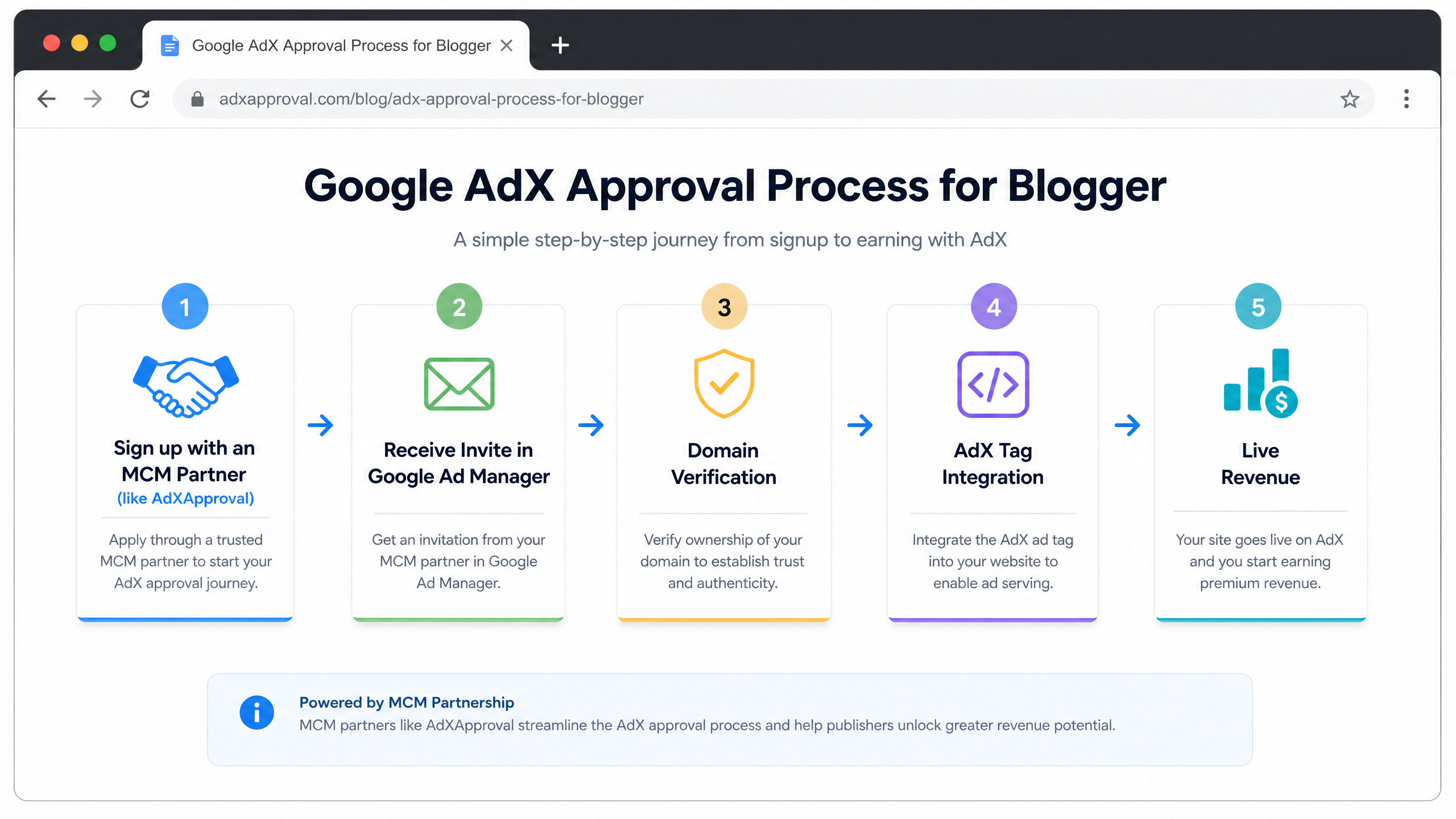
Alt text: Google AdX Approval Process for Blogger
1.Partner Selection: Choose a reputable MCM partner (like Adxapproval) that specializes in connecting publishers to Google AdX. Ensure they have a proven track record and offer transparent terms.
2.Application & Review: Submit your Blogger site for review by the MCM partner. They will assess your site’s traffic, content quality, and adherence to Google’s policies. For example, Adxapproval outlines specific requirements.
3.Google Ad Manager (GAM) Invitation: Once approved by the partner, you’ll receive an invitation to link your site to their Google Ad Manager account. This is where the AdX magic happens.
4.Domain Verification: You’ll need to verify ownership of your Blogger domain within Google Ad Manager, typically by adding a meta tag or a ads.txt file.
5.AdX Tag Integration: The partner will provide you with AdX ad tags to implement on your Blogger site. This usually involves adding code snippets to your Blogger template or using a gadget.
6.Go Live & Optimize: Once tags are implemented, your site will start serving AdX ads, and you can begin monitoring performance and optimizing your setup.
It’s crucial to ensure your Blogger site meets Google’s general AdSense eligibility requirements, as these often form the baseline for AdX approval as well. This includes high-quality, original content, a good user experience, and compliance with all Google Publisher Policies .
5. Integrating AdX on Your Blogger Site: A Step-by-Step Guide
Integrating AdX for Blogger involves a few technical steps, primarily focused on placing the ad tags provided by your MCM partner into your Blogger template. While the exact process might vary slightly depending on your partner, the general approach is as follows:
5.1. Accessing Your Blogger Template
1.Log in to your Blogger dashboard.
2.Navigate to Theme.
3.Click on the Edit HTML button to access your blog’s template code.
5.2. Placing AdX Header Code
Your MCM partner will likely provide a piece of code that needs to be placed within the <head> section of your Blogger template. This code typically initializes the Google Ad Manager library and defines your ad slots.
•Locate the <head> tag in your HTML.
•Paste the provided header code just before the closing </head> tag.
5.3. Implementing AdX Ad Units
For each ad unit, you’ll receive a specific code snippet. These snippets define where the ads will appear on your page. You can place these in various locations:
•Within Post Content: For in-article ads, you might need to manually insert the code into your post’s HTML when writing or editing. This can be done by switching to the HTML view in the Blogger post editor.
•Sidebar Gadgets: For sidebar ads, you can use Blogger’s
Layout gadget. Go to Layout -> Add a Gadget -> HTML/JavaScript, and paste your ad unit code there.
•Within Blogger Template (Advanced): For more precise placement, you can directly edit the HTML template to insert ad units in specific sections like above the fold, below the post title, or at the end of the post. This requires a basic understanding of HTML and Blogger template structure.
After integrating the ad tags, it’s crucial to save your changes and monitor your site to ensure ads are displaying correctly. Your MCM partner will also provide guidance and support during this integration phase.
6. Optimizing Your AdX for Blogger Setup for Maximum Performance
Simply integrating AdX for Blogger is the first step; optimizing it for maximum revenue is an ongoing process. Here are some key strategies to ensure you’re getting the most out of your AdX setup:
•Ad Placement and Visibility: Experiment with different ad placements to find what works best for your audience and content. Ads that are more visible and strategically placed tend to perform better. Ensure ads are above the fold where appropriate, but always prioritize user experience.
•Ad Formats: Utilize a variety of ad formats, including display, native, and video ads, if supported. Responsive ad units are essential for ensuring your ads look good on all devices.
•Floor Pricing: Work with your MCM partner to set optimal floor prices. Floor pricing allows you to set a minimum bid price for your ad inventory, preventing it from being sold too cheaply. Too high, and you risk low fill rates; too low, and you leave money on the table. Finding the sweet spot is key to maximizing revenue .
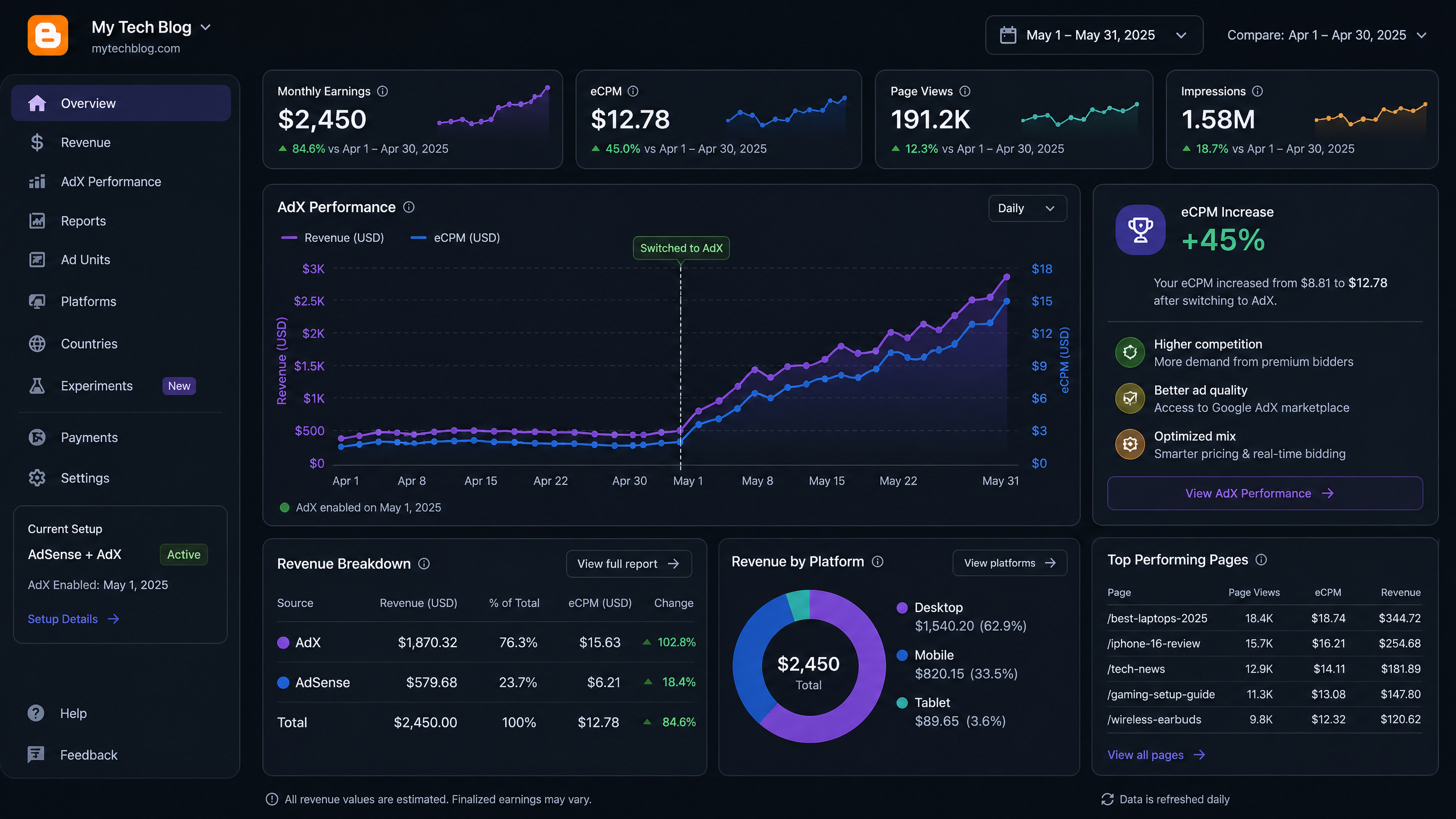
Alt text: AdX Revenue Dashboard showing increased earnings for Blogger
•Block Controls: Use block controls to prevent undesirable ads from appearing on your site. This helps maintain brand safety and a positive user experience. Your MCM partner can assist with this.
•Reporting and Analytics: Regularly review your AdX reports and analytics to understand which ad units, placements, and formats are performing best. Use these insights to make data-driven decisions for optimization. Pay attention to metrics like eCPM, fill rate, and viewability.
•Traffic Quality: Continue to focus on generating high-quality, organic traffic to your Blogger site. Advertisers pay more for engaged audiences, so a strong content strategy is paramount for long-term AdX success.
7. Future-Proofing Your Monetization Strategy with AdX
The digital advertising landscape is constantly evolving, and staying ahead requires a flexible and robust monetization strategy. AdX for Blogger offers a significant advantage in this regard, providing a future-proof solution for several reasons:
•Access to Programmatic Demand: AdX is at the forefront of programmatic advertising, giving you access to advanced buying methods and technologies that are shaping the future of online ads.
•Diversified Revenue Streams: By leveraging AdX, you diversify your revenue sources beyond just AdSense, making your blog less susceptible to fluctuations in a single platform.
•Enhanced Control and Transparency: Through your MCM partner and Google Ad Manager, you gain greater control over your ad inventory and more transparency into how your ads are being sold and priced.
•Adaptability to Industry Changes: AdX is continuously updated by Google to adapt to new privacy regulations, browser changes, and industry standards, ensuring your monetization strategy remains compliant and effective.
Embracing AdX for Blogger positions your blog for sustained growth and profitability in the dynamic world of online publishing. It’s an investment in the long-term financial health of your content creation efforts.
8. Conclusion: The Undeniable Advantage of AdX for Blogger
In conclusion, for any serious Blogger looking to maximize their ad revenue, transitioning to or integrating AdX for Blogger is a strategic move that offers undeniable advantages. From unlocking significantly higher CPMs and fill rates to providing access to premium advertisers and advanced optimization tools, AdX stands head and shoulders above traditional AdSense alone.
The process, while requiring partnership with an MCM provider, is a worthwhile investment that can lead to a 20-50% increase in your earnings. By following the steps for approval and integration, and continuously optimizing your setup, you can transform your Blogger site into a highly profitable asset. Don’t let your hard work go under-monetized; embrace the power of AdX for Blogger today and take control of your financial future.